
Updated August 2026
How to Redeem SCP Architect X Codes
Redeeming codes in SCP Architect X takes less than a minute once you know where the menu lives, yet it is the number-one support question in Discord during beta weekends. Every working code—from 5mVisitz to past promotions like jumpStart and 2milEZ—uses the same redemption pipeline inside the Shop interface. This guide walks through each step on PC and mobile, explains prerequisites such as completing the tutorial, and covers troubleshooting when the game insists a valid code is invalid. After redeeming, visit the active codes page for current rewards or the expired codes archive if your string no longer works.
Before You Redeem
SCP Architect X gates the Shop menu until you finish the opening tutorial sequence. The tutorial introduces build mode, basic containment placement, and your first Scientist assignment. Skipping or disconnecting mid-tutorial can leave UI elements hidden, including the Shop icon at the bottom of the screen. If you do not see Shop, rejoin the experience and allow the tutorial prompt to complete rather than rushing into free build.
Codes apply once per Roblox account, not per facility save slot. Redeeming 5mVisitz on an alt account is valid; attempting the same code twice on one account produces an already redeemed message. Make sure you are logged into the account you want to fund. Family-shared devices sometimes cause players to redeem on the wrong profile and believe the code was broken.
Confirm you copied the code without extra spaces or hidden characters from mobile clipboards. Paste into the text field and visually inspect the string before pressing Submit. Codes never include punctuation beyond letters and numbers.
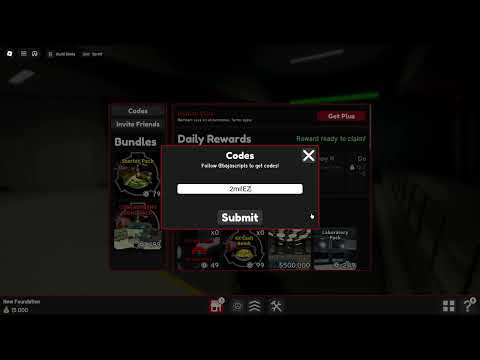
Redemption Steps (Shop > Codes)
Launch SCP Architect X from Roblox on PC, mobile, or tablet. Load into your facility or a fresh public server and wait for the HUD to appear. Locate the Shop button along the bottom toolbar—it sits with other management icons and opens a storefront overlay for gamepasses, boosts, and code entry.
Inside the Shop window, find the Codes button in the top-right corner. Selecting it opens a dedicated redemption panel with a single text input and Submit button. Type or paste your active code exactly. For July 2026, that may be 5mVisitz for a 500,000 Money bonus. Press Submit and watch for a confirmation banner or sound cue indicating success.
Your Money total updates immediately in most cases. If the UI lags, open the foundation management panel to refresh balances before assuming failure. Successful redemption does not require rejoining unless the HUD fails to sync—a rare beta bug fixed by switching servers.
- Launch SCP Architect X on Roblox
- Complete the tutorial if Shop is not visible
- Open Shop from the bottom HUD
- Click or tap Codes (top-right of Shop)
- Enter the code exactly, then press Submit
- Confirm your Money balance increased
Troubleshooting Failed Redemption
An invalid code message usually means one of three things: the code expired, you mistyped it, or you already redeemed it on that account. Cross-check against our active codes list before troubleshooting further. verifiedLetsGo, jumpStart, and 2milEZ are common strings players retry long after expiration—those failures are expected, not server bugs.
When a currently active code fails for multiple players simultaneously, developers may be pushing a hotfix. Leave and rejoin, then try a different public server. Private beta servers occasionally run older builds without updated code tables. Waiting thirty minutes and checking Discord for maintenance notices saves frustration.
Regional connection issues can interrupt the redemption API call. Switch networks or disable VPN services that Roblox flags. If Submit appears to do nothing, check whether a modal error hid behind the Shop window on smaller mobile screens.
After Redeeming Successfully
Treat code money as a strategic boost, not permission to skip core systems. Fund Scientists and Lab Stations first so Safe-class SCP testing generates recurring income. Connect anomalies to desks using the red triangle mechanic described in our connection guide before splurging on decorative tiles or premature Keter cells.
Share working codes with friends but remind them each account redeems once. During beta events, developers sometimes release flash codes with twenty-four-hour windows—speed matters. Keep this wiki and the official Discord handy so your entire task force redeems before expiration.
Frequently Asked Questions
Where is the Codes button in SCP Architect X?
Open Shop from the bottom HUD, then select Codes in the top-right corner of the Shop overlay. That panel contains the text field and Submit button for all codes.
Why does the game say my code is invalid?
Most failures are typos, expired codes, or prior redemption on the same account. Verify against the active list, check capitalization, and try another server if the code was just released.
Do I need Robux to redeem codes?
No. Code redemption is free. Shop also sells gamepasses like x2 Testing Profits, but those are separate purchases and not required for code entry.
Can new players redeem codes immediately?
After the tutorial unlocks Shop, yes. Players who skip the tutorial may need to finish it before the Codes button appears.